
Guide for business owners
Customer Groups and Time-Window Offers: Give the Right Offer at the Right Hour
A discount for everyone, all day, teaches people to wait for discounts. An offer for one group, at one hour of the day, fills a quiet slot without touching the rest of your margin. Here is how to set that up.
A café has two very different problems that look like one. At 8:15 on a weekday there is a queue out the door and nobody needs a reason to buy. At 3:30 the same room is half empty and the espresso machine is idle. A blanket "10% off" fixes neither: it gives away margin at the busy hour and is too weak to move anyone at the quiet one. What works better is narrower: pick who the offer is for, pick the hours it is valid, and let it repeat. This guide covers how to split customers into groups, how to design an offer that runs on a schedule, and how to do both in Pikarta 2.0.
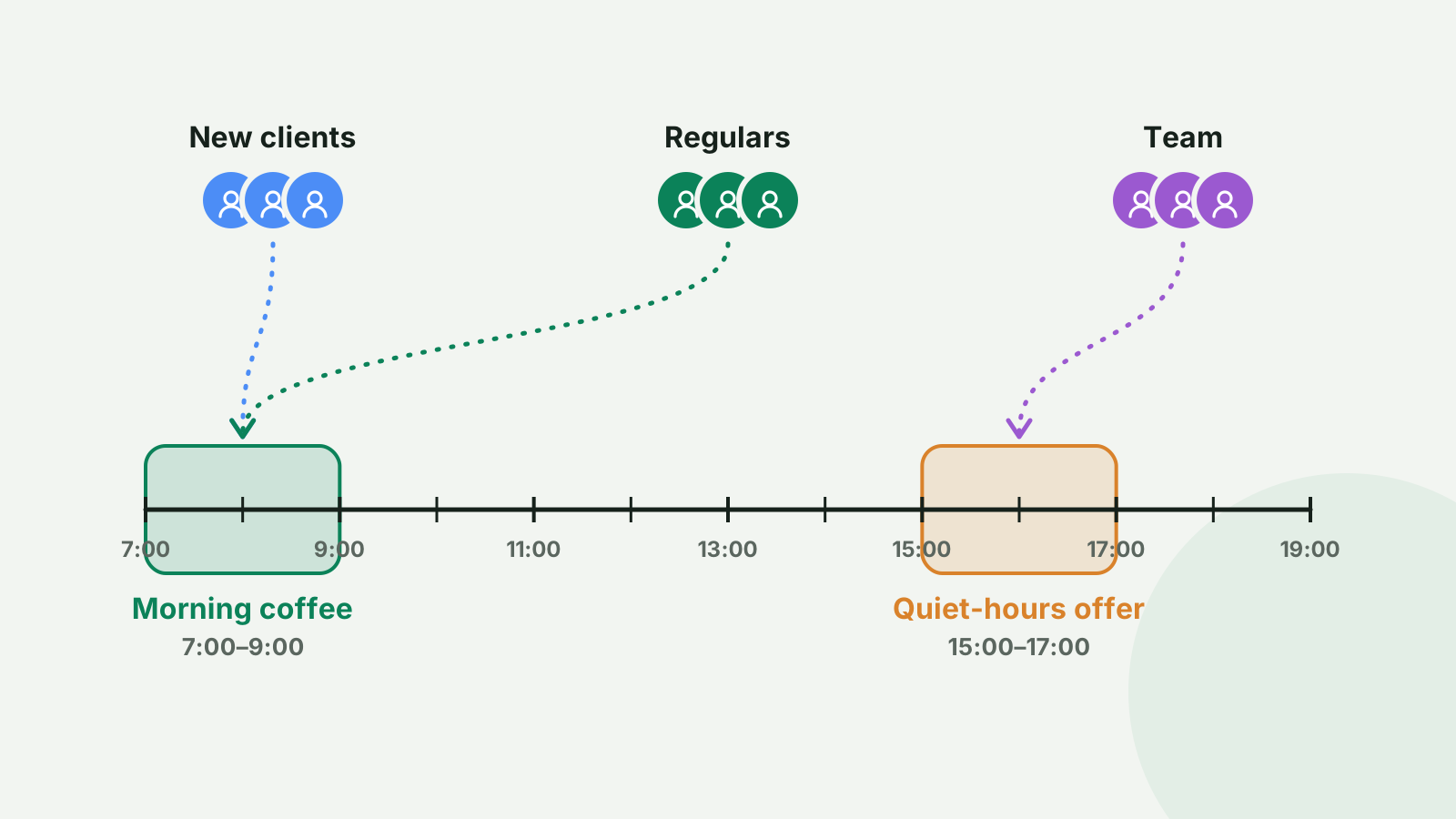
Why offers need a "who" and a "when"
An offer that anyone can use at any hour has a hidden cost: it is used mostly by people who would have bought anyway, at the hours when you were already busy. Two narrowings fix that.
- Who: a new client needs a nudge to come back for the second time. A regular needs recognition, not a discount. Your staff and a few local partners need something that is theirs and not something you broadcast.
- When: a free upgrade between 7:00 and 9:00 is a way to win the commuter who walks past three cafés. The same upgrade at noon is just a cost. A 15:00 to 17:00 offer on Tuesday to Thursday moves demand into hours where staff and equipment are idle anyway.
If you have already tried broad promotions, such as the ones described in holiday loyalty promotions, think of groups and time windows as the controls that let you run that kind of campaign all year without training customers to wait for a sale.
Which groups are worth having
Most small businesses need three to five groups, not twenty. Start from the differences in how you want to treat people:
- New clients. Everyone who has just joined. The goal is a second visit. A welcome offer here is the single most useful offer most businesses will set up.
- Regulars. People who come weekly. They do not need a discount; they need a perk that says you noticed: a free upgrade, first look at a new item.
- Team. Your staff and their friends, if you want to give them a standing perk without printing anything.
- Local partners or ambassadors. A hairdresser next door, a coworking space, a blogger who sends people your way. A separate group means a separate offer you can switch off without affecting anyone else.
- Test groups. Two random halves of your customer base, to compare two offers fairly.
Resist the urge to build a group for every idea. Every group is a list you have to maintain, and a client who is in the wrong group gets the wrong message.
Designing an offer that repeats
A normal coupon is used once. A repeating offer works differently: it stays valid, and the customer can use it again on its schedule until it expires. Four settings define it.
- The benefit. A free item, a percentage off or a fixed amount off. "Two pizzas for the price of one" is simply a free item, named plainly: "Second pizza free".
- The time window. From and to, in the business's own time zone: 7:00 to 9:00, or 15:00 to 17:00. A window can run past midnight, which suits bars.
- The days. Every day, or only the ones you pick: Monday to Friday for the commuter offer, Tuesday to Thursday for the slow afternoons.
- The limit and the dates. How many times per day one customer can use it (usually once) and when the offer starts and ends.
Three examples with numbers
| Group | Offer | Window | What it does |
|---|---|---|---|
| Everyone who joined | Free pastry with a coffee | 7:00–9:00, Mon–Fri, once a day | Turns a passing commuter into a morning habit |
| Regulars | Free drink upgrade | 15:00–17:00, Tue–Thu, once a day | Fills the quiet hours with people who were coming anyway |
| Team | 20% off | Any time, once a day | A standing perk for staff, not a promotion |
Do the arithmetic on the second row before you launch. If a regular's upgrade costs you €0.50 and 40 regulars use it twice a week, that is €40 a week. It pays for itself if it brings in even a handful of extra afternoon purchases that would not have happened. If you cannot name roughly how many, make the window shorter or the days fewer.
Reminders: the part people skip
An offer nobody remembers at 7:40 does nothing. A reminder sends a notification to the customer's lock screen at a time you choose, for example "Free pastry with your coffee until 9:00". Keep it disciplined: at most one reminder per offer per day, only on the days the offer is valid, and either inside the window or up to two hours before it. For the morning offer above, a reminder at 7:00 or 6:45 is about right. Reminders are off until you switch them on.
Mistakes to avoid
- A window so narrow nobody can make it. 7:00 to 7:30 is a trap, not a perk. Two hours is a reasonable minimum.
- Overlapping offers. A customer in two groups can end up holding several offers at once. Pikarta limits a customer to three active coupons, and the card gets crowded long before that.
- Forgetting the cashier. If staff do not know the rule, the first customer who shows the offer at 9:10 gets an argument. Tell the team the window and the days.
- Reminding too often. A message every day for weeks turns into noise. Use reminders for offers that matter and let the rest sit on the card.
How to do it in Pikarta 2.0
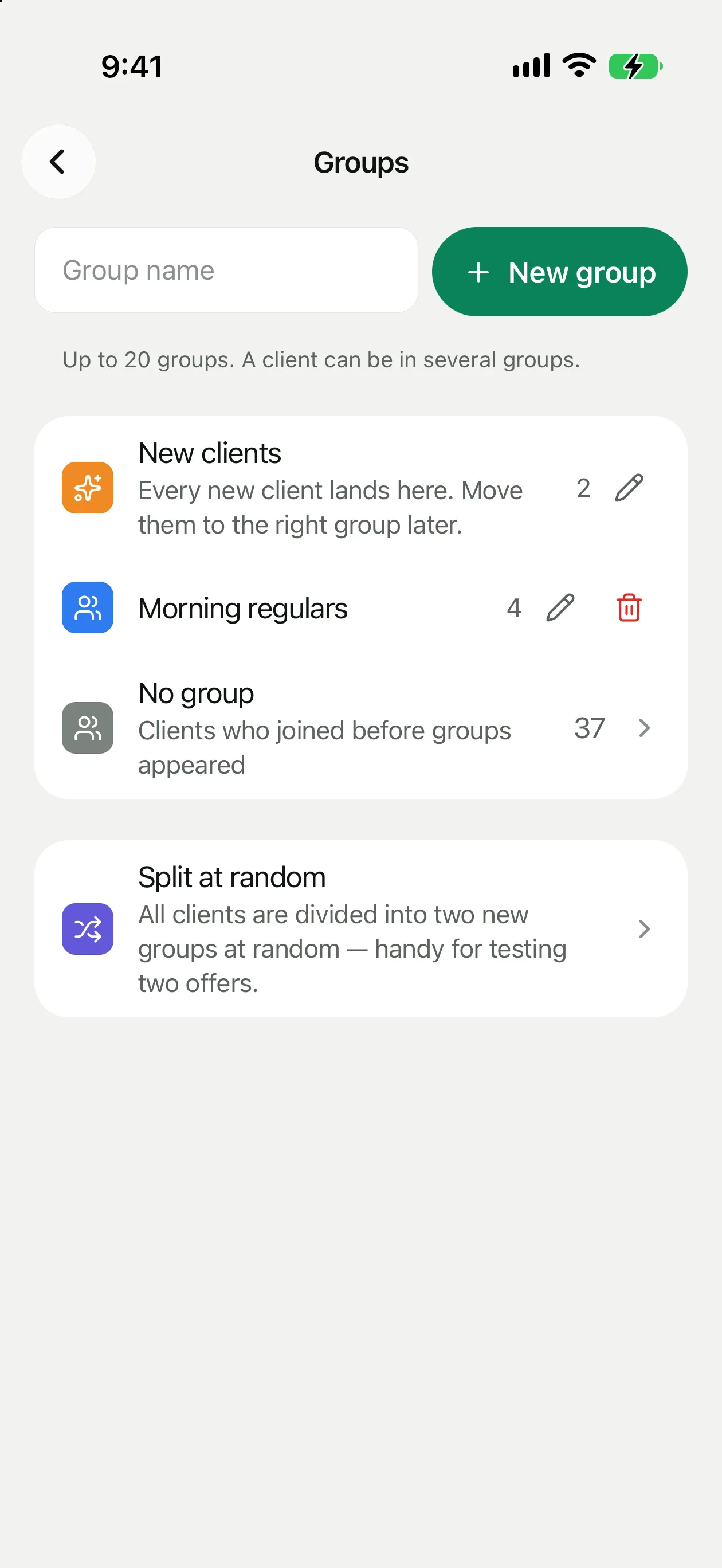
Groups. In Pikarta 2.0 every business has a built-in group called "New clients". Everyone who joins is added to it automatically; you can rename it but not delete it. From there you move clients to the groups you create: one from their profile, or several at once from the client list. A client can also be in more than one group. You can have up to 20 groups, with names up to 40 characters. Clients who joined before 2.0 are not put into "New clients"; find them with the "No group" filter and move them from there. For testing two offers, "Split at random" divides your clients into groups of random composition, such as Group A and Group B. The groups help article covers the screens in detail.
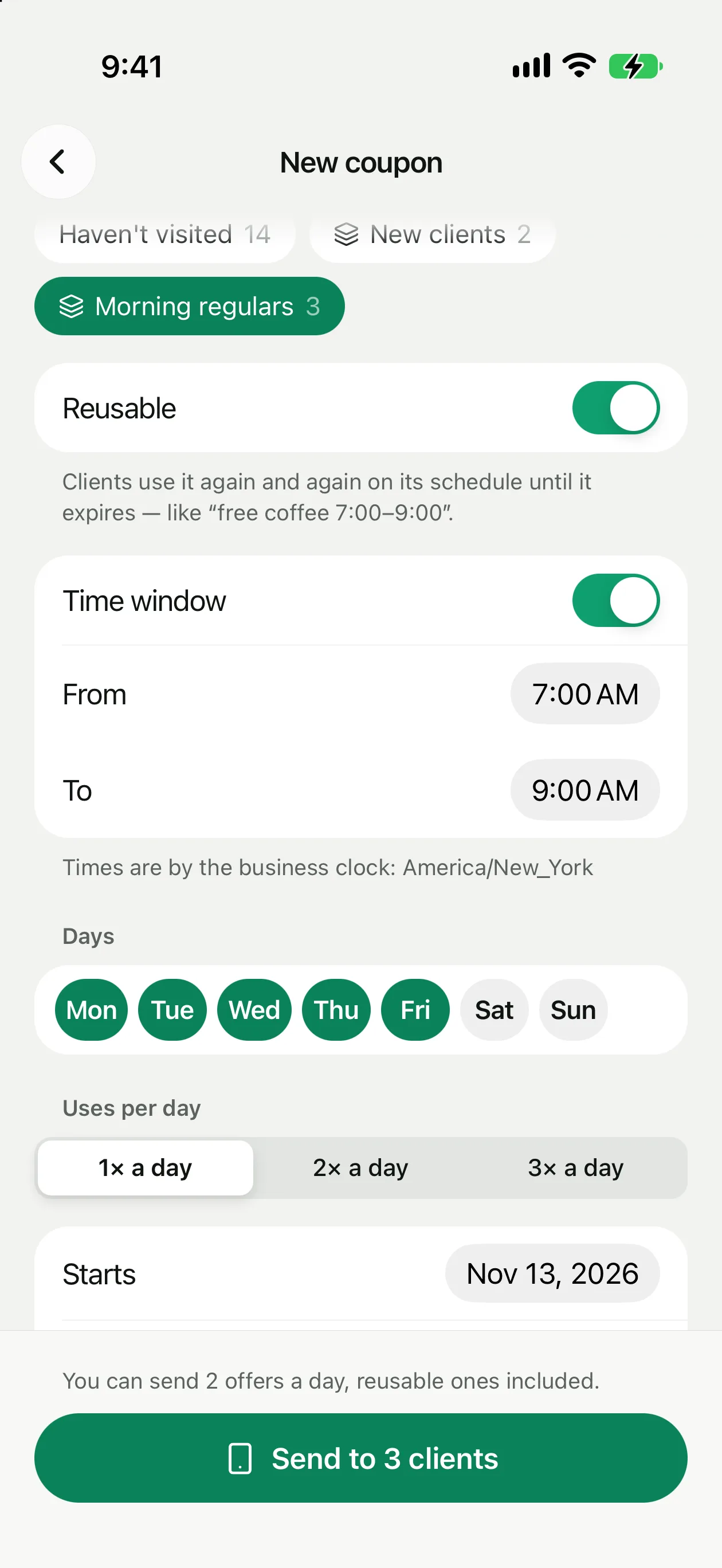
The offer. Create a coupon as usual, choose a group under "Send to" and switch on "Reusable". Then set the time window, the days, uses per day and a start date, and optionally the reminder. Times follow your business's clock, and the form says which one. Two limits to plan around: you can send two offers a day, reusable ones included, and a client can hold up to three active coupons. More about coupons is in the coupons help article.
What the customer gets. The offer appears on their card in Apple Wallet or Google Wallet. If someone joins a group, they immediately receive that group's active repeating offers, which is what makes a welcome offer on "New clients" reach every newcomer at once. Offers already sent are not taken back if you later move a client to another group.
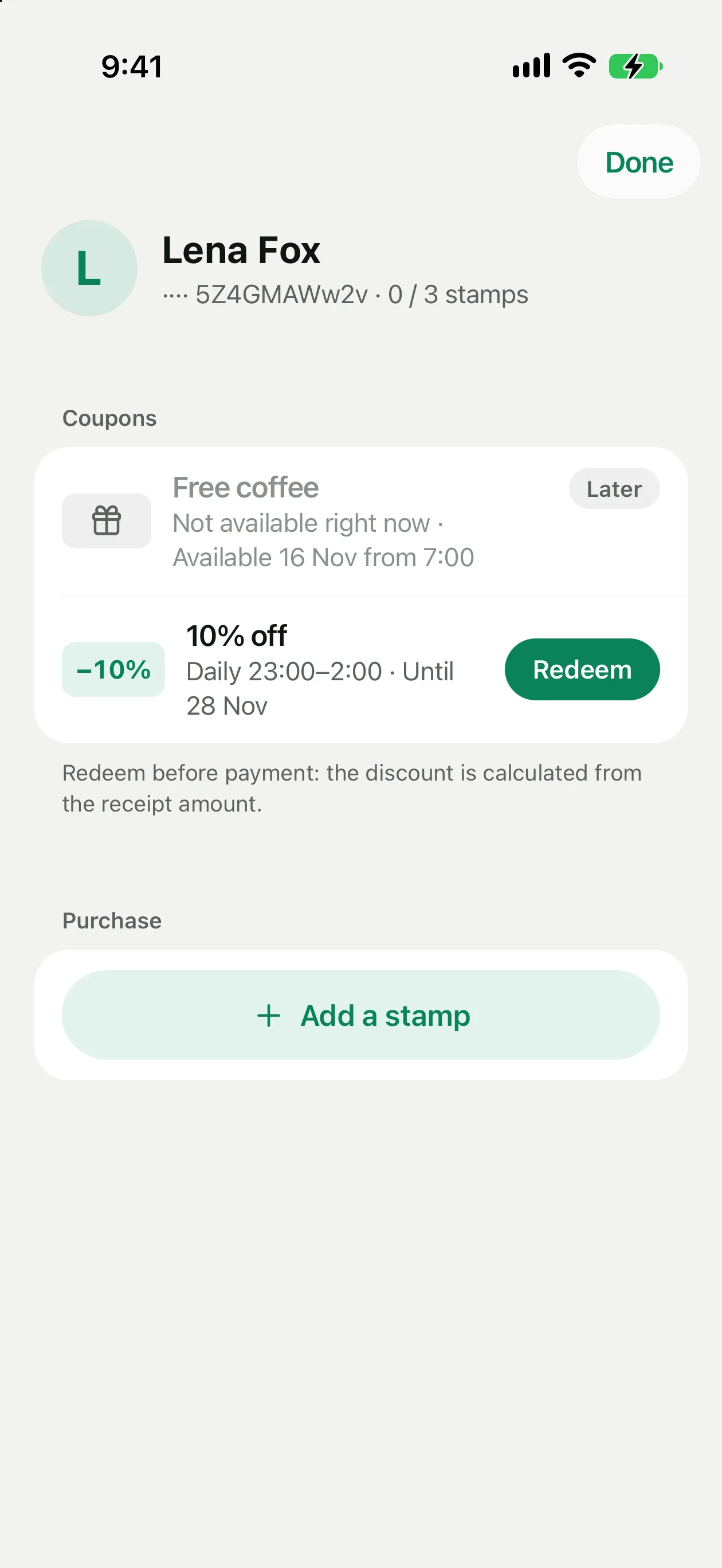
At the counter. The cashier scans the card and sees the offer with its status: available, "Not available right now" with the time it opens, or "Already used today". You get a notification each time a cashier redeems one, so you can see in real time whether the offer is being used.
A first week plan
Start with one group and one offer. Put a welcome offer on "New clients": something small that makes the second visit easy. Next week add a morning or afternoon window for a group of regulars. After two weeks look at the number of redemptions the notifications gave you and decide whether to extend, shorten or drop each offer. If new people are the bottleneck, getting customers to join comes first; if existing ones have drifted, winning back lapsed customers is the next step.
Create your first customer group. 30-day free trial, no card details needed to start.
Get Pikarta on the App StoreQuestions
What owners ask about groups and time-window offers
How many customer groups should a small business have?
Three to five is plenty for most: new clients, regulars, staff and one or two partner or test groups. Each group is a list you have to keep accurate, and an offer sent to the wrong group is worse than no offer.
Can one customer be in several groups?
Yes. A regular can also be part of a partner group, for example. Groups created by one random split are the exception: they do not overlap with each other, so you can compare two offers fairly.
What is a reusable offer?
An offer the customer can use again and again on its schedule until it expires, such as a free pastry with coffee between 7:00 and 9:00 on weekdays. You set the time window, the days and how many times a day one customer can use it.
What if a customer shows the offer outside the time window?
The cashier sees that it is not available right now and when it opens, so the offer cannot be redeemed early. Once it has been used the allowed number of times in a day, it shows as already used today.
Is there a limit on how many offers I can send?
You can send two offers a day, and reusable offers count towards that. A client can hold up to three active coupons at the same time.
30 days free
Send the right offer to the right customers
15 minutes, no code, free for 30 days.