
Guide for business owners
Loyalty Program Tiers: Classic, Gold and Diamond for a Small Business
A tier system rewards the customers who already come most, and gives everyone else something to climb toward. Done well it is cheap and visible. Done badly it is a label nobody notices. Here is how to decide whether you need one and how to set it up.
Airlines and hotels made tiers famous, and it is easy to assume they only work at that scale. They do not need to. The idea is simple: your best customers get a better version of the same program, and everyone else can see that version from where they stand. For a café, a salon or a small shop the effect is a bit different from an airline's. It is less about lounge access and more about being recognised: the card looks different, the reward is a notch better, and the next level is close enough to aim for. This guide covers when that is worth setting up, how to choose thresholds that real customers will reach, and how it works in Pikarta 2.0.
When tiers make sense, and when they do not
Tiers need two things to work: customers who come often enough to climb, and a gap between your best customers and your average ones that is worth marking. Check these before you build anything.
- You have regulars. If most people visit once or twice a year, nobody will ever reach the second level and the system is decoration. Think of businesses with weekly or fortnightly habits: coffee, lunch, haircuts, groceries, a gym.
- The top level is reachable in months. A level that takes three years to reach is invisible. A reasonable aim is that a real regular gets to the first level within a month or two, and to the top within about six months.
- You can name what each level gets. If the honest answer is "the same thing, with a badge", that may still be fine, as long as the badge is visible. But an actual difference works better.
If you are still choosing a mechanic, tiers are an add-on, not a replacement. Pick a base mechanic first: stamps, points, cashback or discount. Tiers sit on top of whichever you chose.
Setting thresholds in your program's own units
The mistake that sinks most tier systems is picking thresholds from imagination. Work from what a real regular does, in the units your program already counts. The units depend on the mechanic:
| Program | What counts toward a level | Example thresholds |
|---|---|---|
| Stamps | Completed rounds | Gold after 1 round, Diamond after 5 |
| Points | Points earned over time (spending a balance does not lower it) | Gold at 500, Diamond at 1,000 |
| Cashback | Total purchases over time | Gold at €300, Diamond at €1,200 |
| Discount | Visits | Gold at 10 visits, Diamond at 30 |
Run the numbers on a typical regular. On a stamp card with ten stamps, a customer who comes three times a week fills a round in about three weeks and reaches five rounds in about four months: that is a sensible Diamond. On a points program earning one point per euro, a regular who spends €25 a week reaches 500 points in 20 weeks and 2,000 in about a year and a half, which is too far away. Drop Diamond to 1,000 and it becomes a goal rather than a rumour.
Two rules of thumb. Make the gap between levels bigger as you go up, but not dramatically so: the second jump can be two or three times the first. And always check the threshold against your own busiest regulars. If none of them would be Diamond today, it is too high.
What to give each level
The levels need something concrete to differ in. The most natural thing is the reward itself, in whatever form your program uses:
- Stamps: a better final reward. Classic gets a free coffee, Gold a free coffee and a pastry, Diamond a bag of beans.
- Points: a better reward at the same point price.
- Cashback: a higher percentage: for example 5, 7 and 10 percent.
- Discount: a bigger discount.
Whatever you choose, cost it. A Diamond customer who spends €1,200 and gets 10 percent back costs you €120, so the level has to earn that back in extra visits or higher spend. The extra cost is usually small, because the people at the top are few, but it is worth knowing that number before you promise it.
Do not underestimate recognition. The card itself changing look is part of the reward: a customer who sees a gold badge in their Wallet every time they pay is being told something. Rewards that cost you little and mean something: priority for a new item, a free upgrade, a name on a "regulars" list.
Mistakes to avoid
- Thresholds nobody reaches. If after three months no customer has made it to Gold, the first threshold is too high.
- Gold that feels the same as Classic. A one-percent difference in cashback will not make anyone change a habit. The step has to be noticeable.
- A top level so generous it eats margin. Do the sums for your top ten customers, not for the average one.
- Tiers before the base works. If people do not join the program, or the basic reward is not compelling, levels will not fix that. Get the foundation right first, for instance with a ladder of rewards on a stamp card.
How it works in Pikarta 2.0
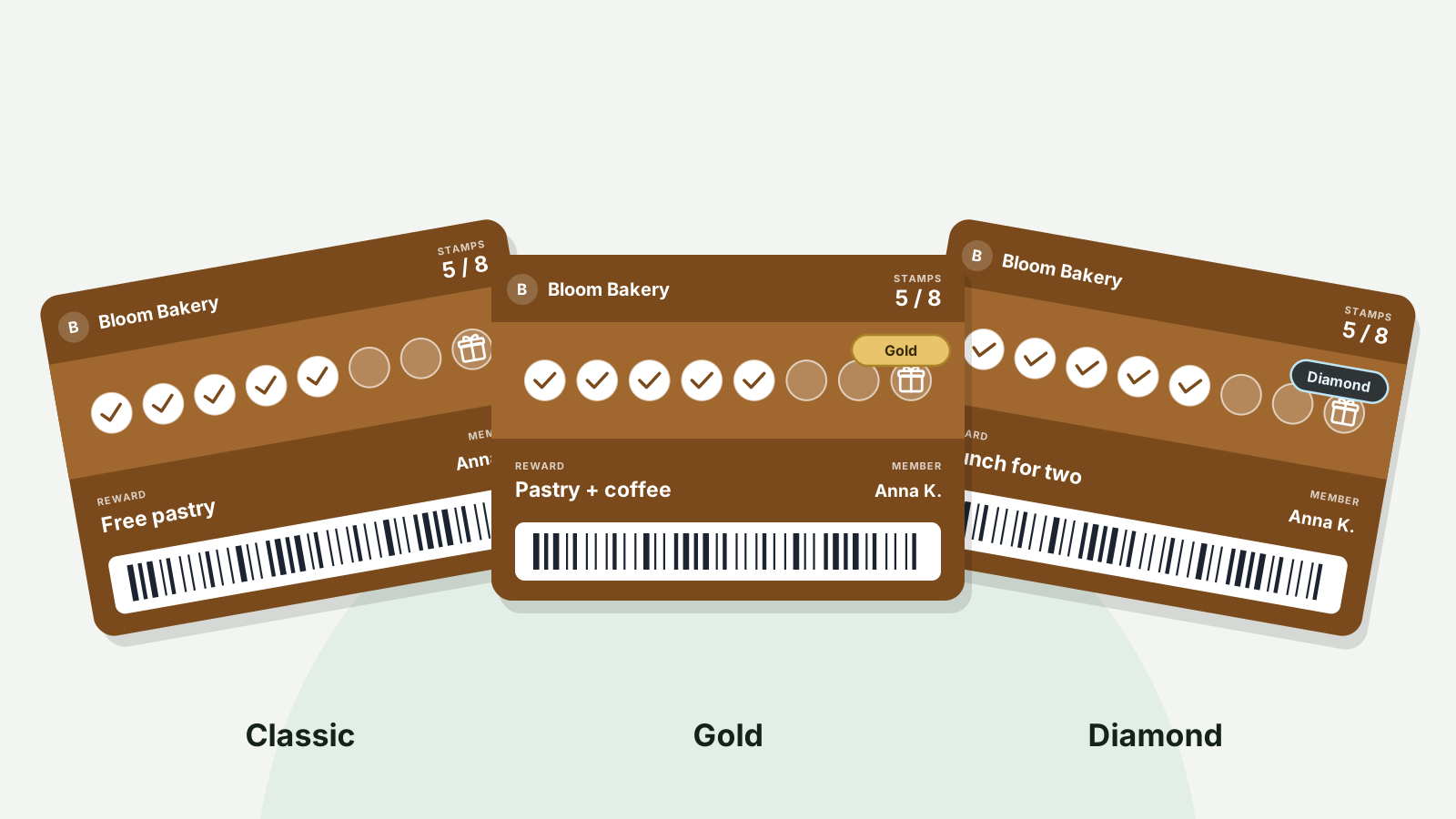
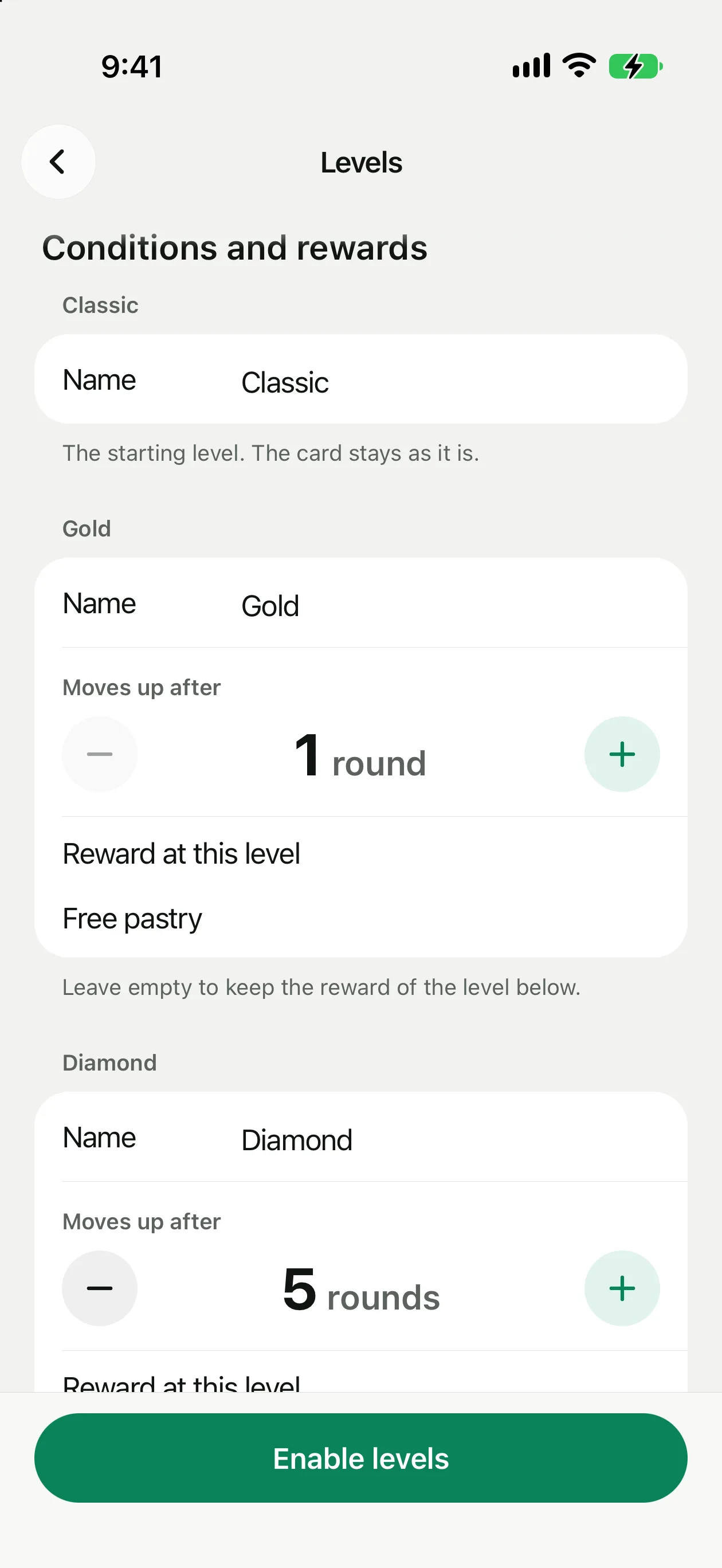
Pikarta 2.0 adds three fixed client levels: Classic as the starting level, then Gold and Diamond. You cannot add or remove levels, but you can rename them (up to 20 characters, different from each other). Classic is your card exactly as it is today: switching levels on does not change a single Classic card.
Open Settings → Levels. Levels are off until you switch them on, and the screen walks you through it:
- Set the conditions. For each level you enter the threshold in your program's units: rounds for stamps, points, visits, or an amount of purchases for cashback. Defaults are filled in for stamps (Gold after 1 round, Diamond after 5), points (500 and 2,000) and visits (10 and 30). For cashback there are no defaults, because currencies differ too much; you enter the amounts yourself.
- Set what each level gets. Depending on the program: the reward name for stamps or points, a cashback percentage, or a discount percentage. Leave a field empty and the level uses the one below.
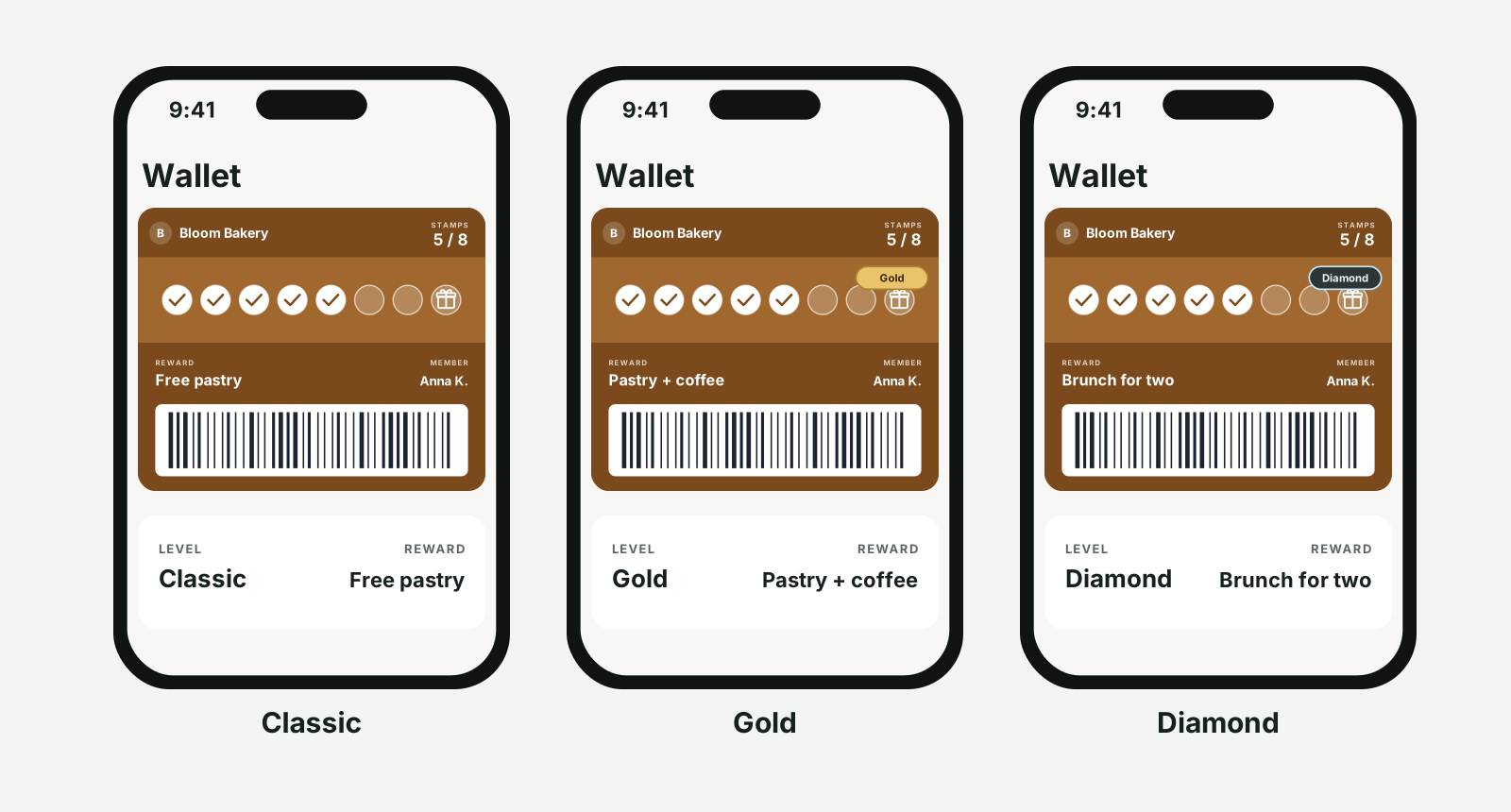
- Choose how the card changes. Three modes. "My design + level badge" keeps your banner, colours and logo and adds a level badge to the banner; it is the default. "Ready-made themes" gives Gold and Diamond Pikarta's own themes (Champagne and Platinum). "My own design" lets you set colours, banner and poster for Gold and Diamond yourself.
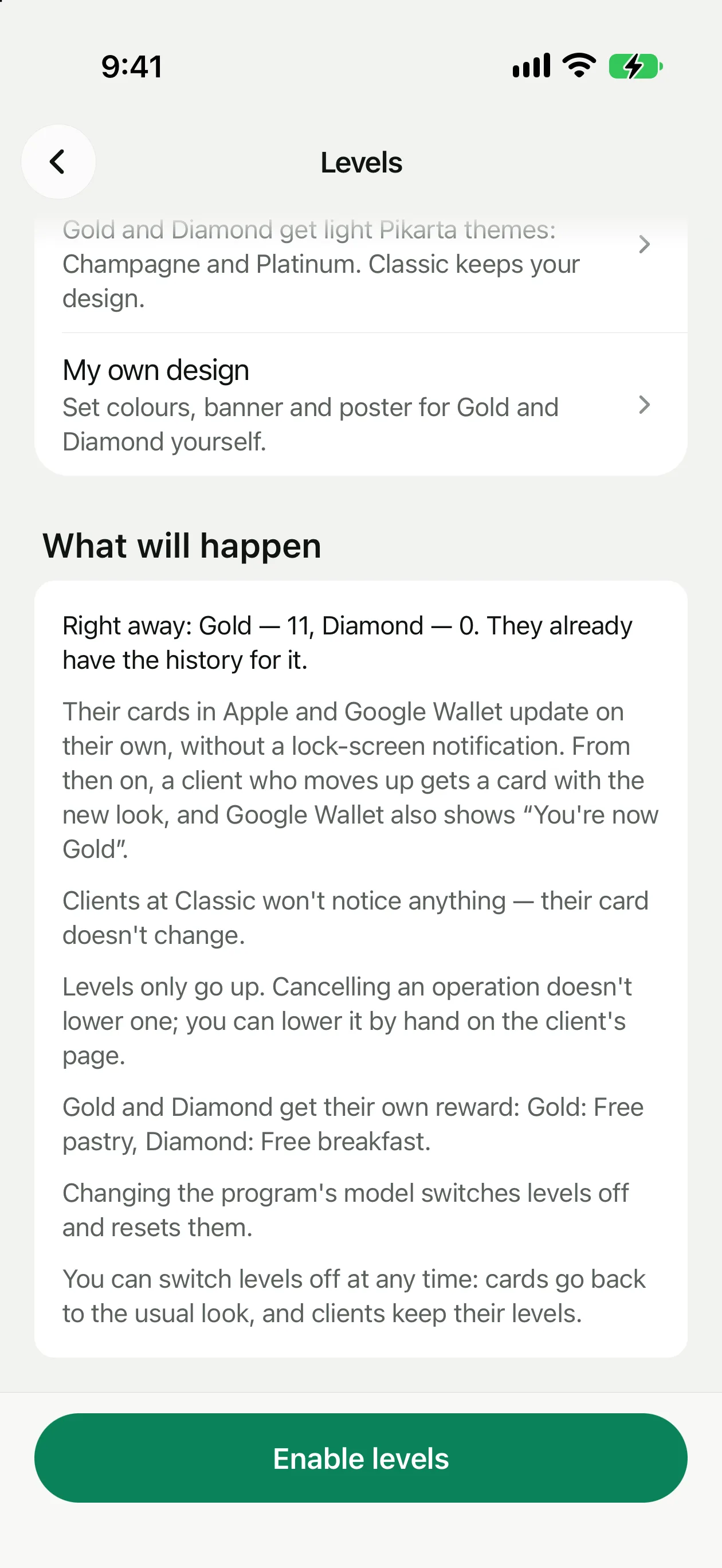
- See what will happen, then enable. Before you switch on, the screen counts your existing clients: how many will move to Gold or Diamond straight away, because the history already qualifies them. Their cards update in the background without a lock-screen notification, so enabling it will not wake your whole base at once.
After that it runs on its own. When a customer reaches the condition, their card in Apple Wallet and Google Wallet changes look and their reward changes with it. In Google Wallet they also see a message such as "You're now Gold". Apple Wallet does not show an announcement on the lock screen; the card simply updates. The back of the card lists the levels and what is left to the next one, for example "3 more rounds to Diamond". A level name is not printed on the front of the card, so the badge or colour does the talking.
A few rules worth knowing. Levels only go up: cancelling a purchase never drops a customer a level, and raising your thresholds later does not demote people who already reached one. You can set a level by hand on a client's page, up or down, for example to make a friend of the house Diamond from day one. In the client list you can see each person's level and filter by it. If you want an offer for Gold clients only, filter by level, move them into a group and send the offer to that group; the guide to groups and time-window offers shows how. Changing the program's model switches levels off and resets them. You can switch levels off at any time: cards go back to the usual look, and customers keep their levels in case you turn them on again. The levels help article walks through each screen.
A sensible way to launch
Look at your busiest regulars first and pick a Diamond threshold that three or four of them would already have. Set Gold at a level any regular can reach in a month or two. Give each level one clear difference. Then enable it and look at the preview numbers: if the count of people who move up immediately is tiny, or nearly everyone, adjust before you switch on. After a month, check whether the people just below Gold are visiting more often; that is the sign the system is doing its work. If you are weighing it against points or cashback as a base, how to set up a points program and cashback for small business go into the arithmetic of each.
Set up customer levels for your regulars. 30-day free trial, no card details needed to start.
Get Pikarta on the App StoreQuestions
What owners ask about loyalty tiers
Does a small business really need loyalty tiers?
Not always. They pay off when you have regulars who visit often enough to climb, and a visible gap between your best customers and average ones. If most of your customers visit once or twice a year, a good base reward does more than levels.
How many levels can I have?
Three: Classic, Gold and Diamond. They are fixed, so you cannot add or remove one, but you can rename them. Names can be up to 20 characters and must be different.
Can a customer lose a level?
Not automatically. Levels only go up, so cancelling a purchase or raising the thresholds later does not demote anyone. You can lower a level by hand on the client's page if you need to.
What happens to my existing customers when I turn levels on?
Before you enable levels, the screen shows how many clients would move up right away based on their history. Once enabled, those clients get the level they have earned, and their cards update quietly, without a lock-screen notification.
Can I give a VIP the top level straight away?
Yes. The owner or a manager can set any level on a client's page. After that the client keeps moving up by the usual rules.
30 days free
Give your best customers a level to be proud of
15 minutes, no code, free for 30 days.